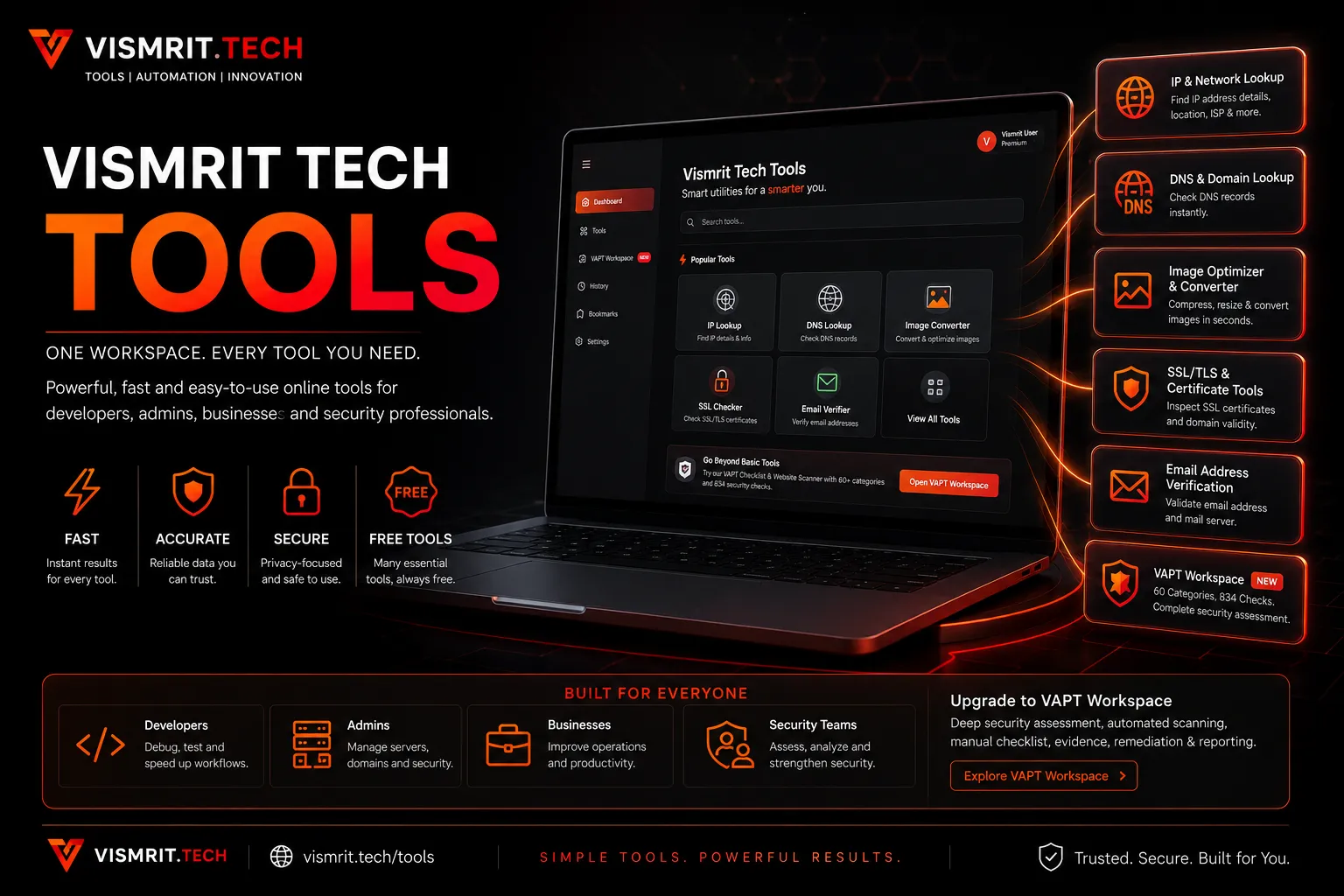
Today, we are introducing a new part of the Vismrit Tech ecosystem: Vismrit Tech Tools.
Vismrit Tech Tools has been created around a simple idea: the small technical checks developers, administrators, businesses and security professionals perform every day should not require ten different websites, disconnected interfaces or unnecessary subscriptions.
Instead of moving between separate services for an IP lookup, DNS records, SSL information, image conversion, email verification and website security assessment, Vismrit Tech Tools brings these workflows together inside one unified workspace.
The platform is available through vismrit.tech/tools, with the actual utilities connected to the Vismrit customer dashboard.
Why We Built Vismrit Tech Tools
Modern digital work involves hundreds of small technical tasks.
A developer may need to verify where a domain is pointing before deploying an application. A business may need to check whether an email domain can receive messages. A system administrator may need to inspect an SSL certificate before renewal. A website owner may simply need to reduce an oversized image before uploading it.
None of these tasks individually require a large enterprise platform, yet repeating them across multiple websites quickly becomes inefficient.
Vismrit Tech Tools is our attempt to create a single utility workspace where users can begin with a quick check and move into more advanced work only when it is actually required.
One Vismrit Account, Multiple Utilities
The Tools workspace is connected to the wider Vismrit ecosystem. This means users do not need a completely separate identity or account for every utility.
The objective is to keep everyday tools, commercial software, API products, digital products, security services and future utilities connected to the same customer environment.
This also gives us a foundation on which we can continue adding new utilities without forcing users to constantly discover and learn unrelated platforms.
IP and Network Lookup
The IP & Network Lookup utility provides a quick way to inspect an IPv4 or IPv6 address and understand useful information associated with it.
The tool can be used to:
- Inspect public IPv4 and IPv6 addresses
- Validate whether an address is correctly formatted
- Review reverse-hostname information when available
- View basic network classification
- Review network and location information when available
- Collect useful information before troubleshooting or allowlisting
It is particularly useful when diagnosing access problems, checking the public IP visible to an external service, investigating server connectivity or preparing firewall and allowlist rules.
DNS and Domain Lookup
DNS is one of the most important and frequently misunderstood parts of operating a website or online service.
The DNS & Domain Lookup tool provides a central place to inspect commonly used domain records without switching between several individual DNS lookup websites.
Supported record types include:
- A records
- AAAA records
- MX records
- CNAME records
- TXT records
- NS records
- SOA records
- CAA records
- SRV records
This is useful when configuring a new website, moving between hosting providers, setting up email, verifying third-party services, checking DNS propagation or investigating why a domain is not behaving as expected.
Image Optimizer and Converter
Large images remain one of the most common causes of unnecessarily heavy web pages.
The Image Optimizer & Converter gives users a straightforward way to prepare images for websites, applications, products and digital content.
The current utility supports common formats including JPG, PNG, WebP and GIF as input and provides options for:
- Image resizing
- Maximum width or height control
- Quality adjustment
- File-size reduction
- Conversion to JPG
- Conversion to PNG
- Conversion to WebP
- Immediate download of the processed image
The goal is not to make image processing unnecessarily complicated. It is to provide the controls most users actually need when preparing media for the web.
SSL/TLS and Certificate Tools
HTTPS is now fundamental to operating a modern website.
The SSL/TLS & Certificate Tools section allows users to inspect the certificate currently presented by a website and review information important during installation, troubleshooting and renewal.
Users can inspect:
- Certificate validity
- Certificate expiry
- Hostname and certificate-name relationships
- Certificate issuer information
- General certificate details
- Domain ownership verification workflows where supported
This helps developers and administrators quickly investigate expired certificates, incorrect hostname configurations and browser certificate warnings.
Email Address Verification
Bad email addresses create failed campaigns, unnecessary database records and broken communication workflows.
The Email Address Verification utility provides a lightweight validation layer before an address is stored, contacted or imported into another system.
Checks include:
- Email address format validation
- Mail-domain checks
- MX record review
- Clear validation and warning states
The tool is particularly useful before importing contact lists, adding new leads or connecting an address to an automated business workflow.
Moving Beyond Utilities with the VAPT Workspace
Quick utilities are useful, but security assessment requires considerably more structure.
For users who need deeper website security work, Vismrit Tech Tools includes the VAPT Checklist & Website Scanner.
This workspace combines structured manual security assessment with safe automated website checks and currently includes 60 security categories and 834 checks.
The assessment workflow is designed so that automated findings remain clearly separated from manual assessor checks while evidence, remediation guidance and retesting information can remain connected to the same assessment.
Capabilities include:
- Structured VAPT assessment workflow
- 60 security categories
- 834 individual checks
- Staged automated website scanning
- Live progress during automated checks
- Read-only automated findings
- Editable manual assessment checks
- Evidence management
- Remediation guidance
- Retesting and updated results
- Assessment reporting
The VAPT workspace is currently offered at ₹500 as a one-time payment with lifetime access.
Free Tools Should Still Be Useful
One important decision behind the platform was not to make every small utility a paid product.
The IP, DNS, image, SSL and email utilities are currently included free with a Vismrit account.
The commercial layer begins where the workflow becomes substantially deeper, such as structured VAPT assessment, reporting and longer-term security management.
This allows someone to use Vismrit Tech Tools for simple everyday requirements while still having a clear path toward more advanced capabilities.
Part of a Larger Vismrit Technology Ecosystem
Vismrit Tech Tools is not being developed as an isolated utility website.
It is part of the broader Vismrit ecosystem that connects:
- Software licences
- API subscriptions
- Digital products
- Custom software development
- Website and application development
- UI and UX services
- System integrations
- Automation
- VAPT and security assessment
- Customer projects
- Invoices and fulfilment
Our long-term objective is to create useful technology that remains connected from discovery and purchase through implementation and ongoing management.
Built Around Practical Problems
Vismrit Tech Tools will continue to evolve based on practical problems rather than simply adding features to increase a number on a product page.
We want each utility to answer a straightforward question:
Does this make a real technical task faster, clearer or easier to manage?
If the answer is yes, it belongs in the Vismrit Tools ecosystem.
What Comes Next
The current launch represents the foundation rather than the final form of the platform.
Future development will continue expanding network, domain, developer, media, security and automation utilities while connecting them more deeply with Vismrit APIs and the customer dashboard.
Some utilities will remain simple and focused. Others may develop into complete professional workspaces.
The common principle will remain the same: one account, practical technology and tools designed around real work.
Start Using Vismrit Tech Tools
You can explore the available utilities at:
Existing Vismrit customers can access the tools from their customer workspace, while new users can create a Vismrit account and begin using the available free utilities.
Vismrit Tech — Technology built for real business.